# Component gallery
> Framebuffer previews of the native indicators, meters, tables and popup widgets in the Showcase.
These previews come from the terminal renderer. [Run the Showcase](getting-started.md), then open **Components** to operate the controls with the keyboard or mouse.
## Task indicators
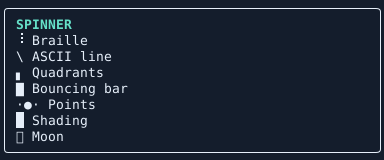
One sampled animation frame. In the application, the host clock advances each active indicator.
Use `TaskStatus.create` when one control follows a task through queued, running, and finished states. For a standalone animation, the optional `Ranvier.Terminal.Components` library provides `Spinner.create` and `Pulse.create`. Pass a tick accessor so animations share the application's clock.
## Meters
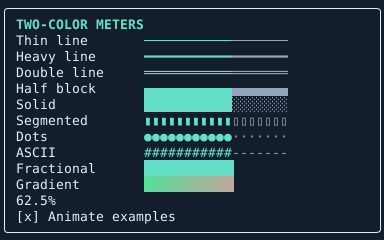
Use the same fraction to compare presentations. Thin, heavy, and double lines distinguish the filled portion by color. Dotted and segmented meters also distinguish it by shape. Fractional blocks resolve changes smaller than one cell.
```fsharp
open Ranvier.Terminal
open Ranvier.Terminal.Components
let level = Meter.create Meter.ThinLine [] 24 (Rgb 0x65E0C8) (Rgb 0x556270) progress
```
Here `progress` is a `unit -> float` accessor returning a value between zero and one.
## Tables
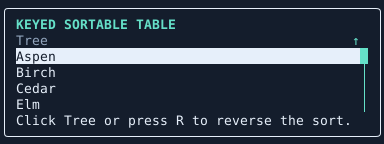
Bind a table's selected key when users need to keep their place through a refresh or reorder. In the Showcase, click the sortable header or focus the table and press **R** to reverse its order. Drag the scrollbar thumb to move through rows. [Selection and navigation](navigation.md)
## Popups
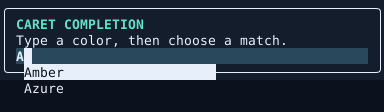
Tooltips attach to a control. Completion lists attach to the editor caret and keep keyboard focus in the editor. Mount their floating surfaces in a `Popup.host` so they can appear over adjacent content.