Server rendering
A template component renders HTML on the server; the browser runs setup again and adopts matching nodes to make them interactive.
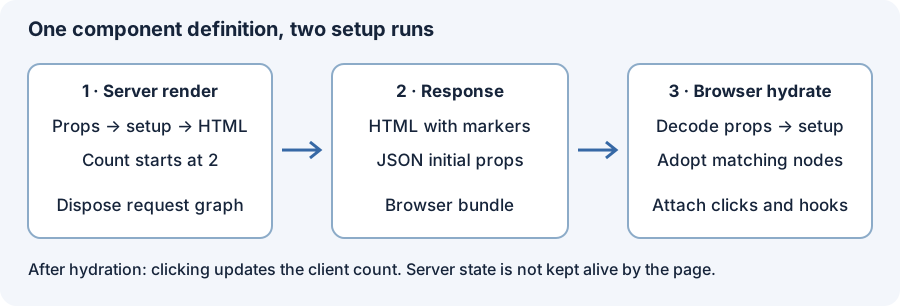
The three steps are:
- Render.
Server.renderruns the component's setup in a new graph, writes its template as HTML, and disposes the graph. It runs on .NET and under Fable. - Transfer. The page carries the props the client needs, encoded as JSON in a
<script type="application/json">element. - Hydrate. In the browser,
Hydration.hydrateruns the same component over the server's nodes: setup runs again, each binding writes its first value only where it differs from the server's node, and the mount keeps the server's elements.
// Server
let html = Server.render { Server.Options.defaults with Policy = Omit } counter { Start = 0; Label = "Clicks" }
// <!--[r--><div class="counter"><span class="label">Clicks</span><button type="button">0</button></div><!--]-->

// Client
let mounted = Hydration.hydrate graph None report Hydration.HydrationOptions.defaults host counter props
Pages
Rendering:
Server.render,renderTo,renderPageandrenderDocument, the HTML they write, escaping, browser-only parts and pending reads.Hydration: what the client adopts, mismatches and
Strict, ids, boundaries and the document head.State transfer:
Server.stateScript,Hydration.readStateandRanvier.Wirecodecs.Deployment: one component project compiled for the server and the client, and the document
Server.renderDocumentwrites around it.Performance: what the server and hydration benchmarks measure, and the figures.
Page declarations: generate the document and browser entry from a shared definition.
F# HTTP backends: serve the same page with Giraffe, Oxpecker or Suave.
Server rendering and other hosts
- Blazor Server keeps one graph per circuit and renders through Blazor's components. See Blazor Server.
Server.renderis independent of it: each call owns a graph for one request. - Elmish components render on the server like any other component. See Elmish components.